FAQs

Frequently Asked Questions

How Winkle works: setup, sleep training, reminders, sharing, your data and getting help.

General questions

What is Winkle?

Winkle is a baby sleep and meal app. It suggests naps, meals and bedtime for your child’s age, replans the day as you log, and supports sleep training if you want it: gentle methods, Ferber-style graduated check-ins, or none at all.

Which devices are supported by Winkle?

Winkle is on iPhone and iPad through the App Store, and on Android through Google Play.
Getting started

How do I set up Winkle for my child?

Download the app, create an account, then add your child and their date of birth. Winkle suggests a sleep and meal schedule for their age, which you can adjust.

Can I customize the sleep training methods and settings?

Yes. Every child starts with age-based defaults drawn from published pediatric guidance, and you can change any of them in that child’s settings. From 4 months you can pick a sleep training method: gentle (no set method), Pick Up / Put Down, or graduated check-ins with wait times you choose.

How do I log sleep and meals?

Tap when your child falls asleep, wakes up or eats. Winkle uses those logs to show what comes next and how the rest of the day is likely to go.

Features

What is the Ferber sleep method?

The Ferber method, sometimes called graduated extinction, has you check on your baby at gradually longer intervals while they learn to fall asleep on their own. Each check-in is brief and calm. In Winkle this is graduated check-ins: log a cry and the app shows how long to wait before the next one.

What is the Cry-it-out method?

“Cry it out” is used for two different things: full extinction, where you don’t go back in until morning (apart from feeds or anything that seems wrong), and graduated methods like Ferber, where you check in at set intervals. Winkle supports the graduated kind, with intervals you choose. It does not offer full extinction.

Can I set reminders for my child’s sleep and meal times?

Yes. Winkle can send a heads-up a little before the next nap or feed, and you choose which reminders you get in the app’s settings.

Can I track diapers?

Yes. In the first few weeks, wet and dirty diapers are one sign a baby is eating enough, so a baby you add before 6 weeks old starts with diaper tracking on. It stops by itself at 6 weeks. Tap Wet, Dirty or Both on the Home screen to log a change, and Winkle shows the last one and today’s totals. To fix a change’s time or type, tap its pencil in your child’s day; the trash can removes it. If you added the child, their settings let you turn tracking on or off at any age, and either pick an age for it to stop or keep it going indefinitely. Caregivers you share your child with can log changes too.

Does Winkle explain sleep training?

Yes. In-app articles walk through the common methods, including graduated check-ins and Pick Up / Put Down, drawn from published pediatric guidance. Every article lists its sources.

Troubleshooting

How do I remove a child?

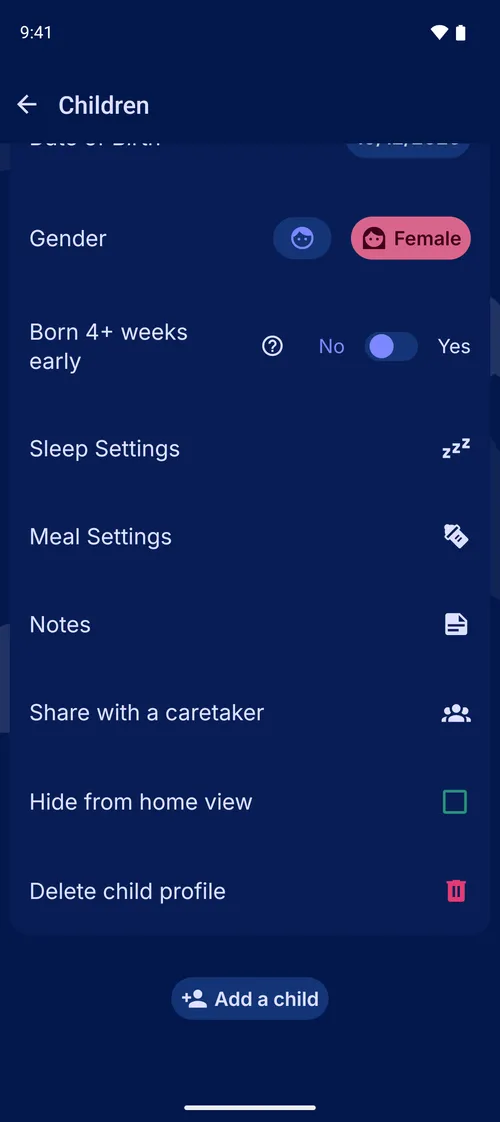
Go to Main Menu → Children, pick the child and tap Delete child profile. This permanently removes the child and their sleep, meal and diaper history.

Winkle’s Children screen, with Delete child profile as the last row of a child’s settings
Children: Delete child profile is at the bottom of the card.
How do I delete my account and all data?

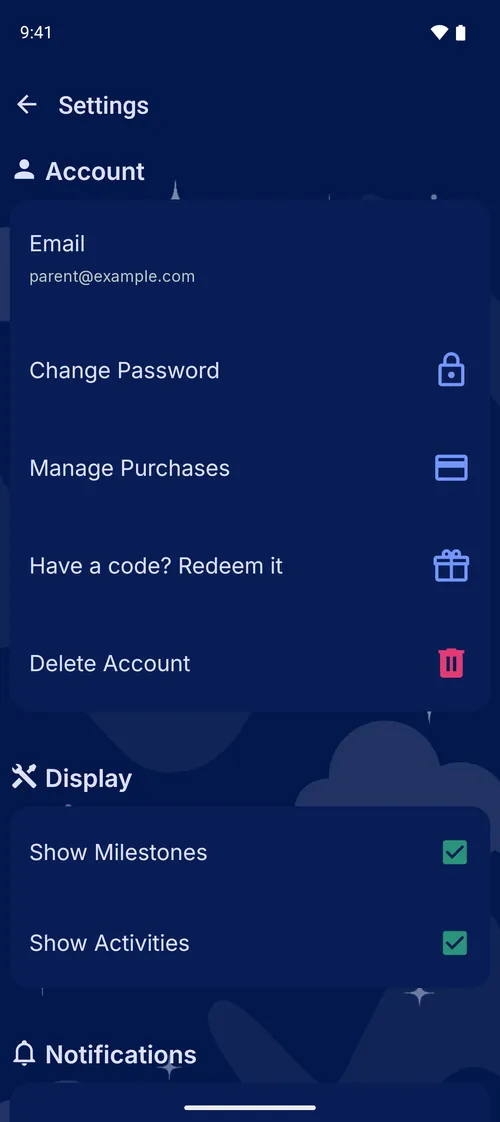
In the app, go to Main Menu → Settings, then tap the trash can on Delete Account in the Account section and follow the steps. This permanently removes your account and every child you added, including their sleep, meal and diaper history; children shared with you stay with their owner. Deleting your account does not cancel a subscription, so cancel that in the App Store or Google Play. See delete your data for more information.

Winkle’s Settings screen, with Delete Account at the bottom of the Account section
Settings, Account: tap the trash can on Delete Account.
How can I contact customer support?

Contact us any time. We’re happy to help with questions, problems or ideas.

Privacy and security

How does Winkle protect my data?

Your data lives in Google Firebase, which encrypts it in transit and at rest. A few service providers process it to run the app, such as subscription billing and the emails you opt in to. We do not sell your data, to advertisers or anyone else. Our Privacy Policy lists every provider.

Can I share my child’s schedule with other caregivers?

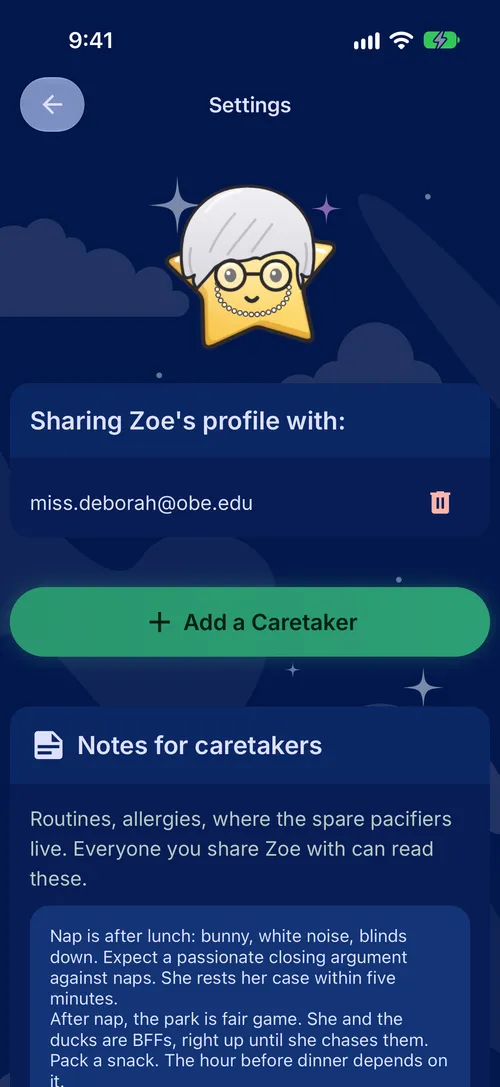
Yes, for free. On the Home screen, tap the menu next to your child’s name, choose Sharing and enter the caregiver’s email. They see the same live schedule and history you do, and they don’t need a subscription.

Winkle’s sharing screen: who a child’s profile is shared with, an Add a Caretaker button, and notes for caretakers
Sharing: add a caretaker by email.